 Anker
Anker Apple
Apple Awei
Awei Baseus
 Black Shark
 boAt
boAt BWOO
BWOO EarFun
 Edifier
 Fastrack
 FONENG
 Havit
Havit Haylou
 HiFuture
 Hoco
Hoco
laptop battery health check Bangladesh

Laptop Battery Replacement Signs in Bangladesh: Health Check & Backup Guide (2026)
Is your laptop battery not backing up the way it used to? Charge dropping to 30–40% and shutting down out of nowhere, or the laptop dying within minutes the moment you unplug it — this isn’t just an isolated glitch. Dhaka’s heat combined with daily heavy usage means laptop batteries in Bangladesh tend to wear out much faster than average. In this guide, we’ll show you how to check your battery’s health yourself, which warning signs to watch for, and when replacement is genuinely necessary. At each step, we’ll point you to what kind of replacement battery is available at CartX BD, so you can make the right call with confidence.
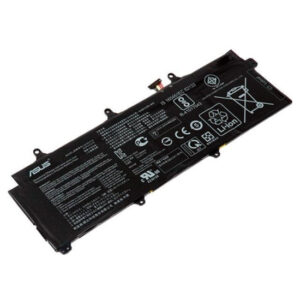
Level 1: Early Warning Signs (No Need to Worry Yet, But Keep an Eye On It)
At this stage the battery is still usable, but performance has started to decline gradually.
- Backup time slowly shrinking: If you used to get 4–5 hours and now you’re under 3, that’s natural wear — typically after 300–500 charge cycles.
- Charging taking longer: The battery charges quickly up to 80% but crawls through the last 20%.
- Battery percentage suddenly jumping: Dropping from 45% straight to 30% is an early sign of a battery calibration issue.
At this point, adjusting power settings (lowering brightness, closing background apps) can extend backup somewhat, but it’s a good time to start actively monitoring battery health.
Level 2: Moderate Wear Symptoms (Start Thinking About Replacement)
- Sudden shutdown at 20–30% charge: The laptop shows charge remaining but powers off anyway — the battery can no longer hold a stable voltage.
- Only runs while plugged in: A clear sign the battery is effectively dead or close to it.
- Overheating: Aging cells generate more heat, and this happens even faster in Dhaka’s hot climate.
- Battery report shows capacity below 60%: You can verify this using Windows’ built-in health check tool (method below).
Level 3: Critical — Replace Immediately
- Swollen case: This is the most important safety warning. If the battery has swollen, stop using it immediately — it’s a fire hazard. A raised trackpad or a bulging area under the keyboard is exactly this signal.
- Under 30 minutes of backup: Very common in batteries 3–4 years old, but at this stage replacement is the only real option.
- “Plugged in, not charging” warnings: Repeated messages like this can point to either a battery or a charging-circuit issue.
Our Expert Take
“How long will my laptop battery actually last?” — In general, a laptop battery can handle 300–500 full charge cycles, which works out to roughly one and a half to two and a half years of regular use. In Bangladesh’s hot climate, this window often shrinks to 18–24 months, especially if the laptop is left plugged in constantly or used in a hot, non-AC room.
“Are all replacement batteries safe?” — No. The market has plenty of cheap, unbranded battery cells that lack proper protection circuitry (overcharge, short-circuit, temperature control) — these carry a real risk of swelling or overheating. That’s exactly why we prioritize verified protection circuits and correct part-number matching in every replacement we recommend.
“Should I repair or replace?” — If the battery health report shows capacity above 60% and there’s no swelling, you can extend its life a bit longer with adjusted power-management settings. But once capacity drops below 60%, or any physical deformation appears, a direct compatible replacement is more cost-effective and safer than repair.
“Should I go with original or compatible battery?” — For most older or discontinued models, a 100% original battery simply isn’t available in the market. In that case, a correctly matched high-quality compatible battery — right voltage, capacity, and part number — delivers solid performance and comes with warranty coverage.
Quick Comparison Table
| Symptom | What It Means | Action Needed |
| Backup dropped from 3–4 hours | Natural cell aging has started | Optimize power settings, monitor |
| Slow charging in the last 20% | Cell efficiency declining | Plan replacement within a few months |
| Sudden shutdown at 20–30% | Voltage stability has broken down | Replace soon |
| Only runs on charger | Battery is effectively dead | Replace now |
| Swollen case | Fire hazard — safety risk | Stop use and replace immediately |
| Capacity report below 60% | Significant loss vs. design capacity | Replacement recommended |
How to Narrow It Down: Check Your Battery Health Yourself
Windows has a built-in tool that lets you check your battery’s real health for free, no cost involved:
- Open Command Prompt — Search “cmd” in the Start menu and run it as Administrator.
- Type the command: powercfg /batteryreport — this generates an HTML report and shows you the file location.
- Open the report — it shows “Design Capacity” (the capacity when the laptop was new) side by side with “Full Charge Capacity” (its current real capacity).
- Calculate the percentage — if Full Charge Capacity is under 60% of Design Capacity, it’s safe to assume it’s time for a replacement.
- Match your laptop model and battery part number — find the part number on the battery itself or in the report, then look up the correct match in CartX BD’s Laptop Accessories
Following these five steps lets you decide based on data instead of guesswork.
Why Buy Your Replacement Battery From CartX BD
- Genuine and A-Grade Quality Cells: Every battery includes overcharge, short-circuit, and temperature protection.
- Precise Compatibility Matching: Model-specific batteries available for all major brands, including HP, Dell, Lenovo, Asus, and Toshiba.
- Warranty Support: Every battery comes with a defined warranty period, so any defect gets resolved without hassle.
- Local Presence, Real Support: Based in Mirpur-12, Dhaka (House-04, Road-33, Uttar Pallabi), so getting direct support is easy — this isn’t a faceless online store.
- Nationwide Delivery, Cash on Delivery: We deliver to all 64 districts of Bangladesh, and you can pay only after receiving the product.
FAQ
Q1: How often should I replace my laptop battery? A: Generally, battery capacity drops significantly after 300–500 charge cycles, or one and a half to two and a half years. In Bangladesh’s hot climate, this can shrink to as little as 18–24 months.
Q2: What should I do if my battery is swollen? A: Stop using the laptop immediately and unplug the charger. A swollen battery is a fire hazard, so have it safely removed by a technician quickly and switch to a replacement battery.
Q3: How can I check battery health for free? A: Run the powercfg /batteryreport command on Windows and compare Design Capacity against Full Charge Capacity to see exactly how much your battery has degraded.
Q4: Is a compatible battery as safe as an original one? A: Yes, as long as it’s built with certified cells and proper protection circuitry, and matches the correct voltage and capacity. Every battery at CartX BD is held to this standard.
Q5: What’s the easiest way to extend my laptop battery’s backup? A: Lower screen brightness, close unnecessary background apps, use Battery Saver mode, and avoid leaving the battery plugged in at 100% all the time — these habits help extend battery lifespan.
Check Your Laptop Battery Today
Don’t wait around if you’re seeing backup drop or any warning sign — especially a safety risk like a swollen battery. Pick the right replacement battery for your laptop model from CartX BD’s Laptop Accessories category, or check detailed pricing in our Laptop Battery Price in Bangladesh 2026 guide. Have questions? Reach out directly — we ship fast across all of Bangladesh from our base in Mirpur-12, Dhaka.